Want to get the ball rolling talking about games accessibility. Context, I am legally blind (20/200, uncorrectable) and still love playing games. I wrote an article on Silksong and what I think could be done about their accessibility, namely a lot of low contrast enemies and projectiles.
I don’t want to litigate difficulty stuff, that’s subjective and everyone’s level is different. As an example, I am decently good at tetris, but that’s because I have the piece colors committed to memory so I know the shape from a single color instead of having to parse the shape. This causes issues in certain game modes that change the colors or make things mono color. For example tetris effect does this, but they have a setting to override it. However, of course this does not work for people who are colorblind.
So the question, what neat accessibility features have you encountered? Alternatively, what features in games work well as accessibility features? Example, almost every Rhythm Heaven minigame can be played completely blind, just listen for the sound cues.
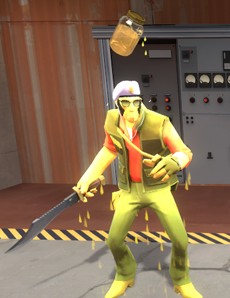
While nothing major or groundbreaking, I’ve always appreciated the colorblindness feature in Team Fortress 2. Various conditions are denoted by a colored effect on the character model. The accessibility option is given to additionally render a floating icon above the head of any character afflicted by a condition. I find that even with ‘normal’ color vision, it is always beneficial to use the option because the information is more easily discernable from a blatant icon than a colored effect, particularly with the proliferation of decoration-only visual effects in the game.
(An image depicting a character model from Team Fortress 2. There is a yellow-tinged visual effect applied to the model as well as an icon of a glass jar filled with yellow liquid above the head of the model.)
This thread reminds me that adding alt text to images here is as easy as changing the text between the [ ] brackets in the markdown. I’ll add clear instructions to this for the FAQ once I get to giving that a proper rewrite.
I think unfortunately it’s easier for me to write a list of games where clearly not a single person ever thought about accessibility then that I remember the ones that did it very well.
My personal issue is that due to a skin condition I swapped from using WSAD to EDAF, and you’d be terrified at the amount of games that either have no keybinding or really limited keybinding. Any time I bump into one that just lets me rebind keys in an easy manner I’m shocked and deeply impressed.
Latest where I noticed it was Fellowship, they let me keybind to the new key, without throwing an error prompt telling me that key is already used and they emptied the original one, so I could easily tell what was just unbound so I could pick a new key for that.